Imagine a perfectly ordinary workday. Several MCP servers already exist, their documentation is written, and developers can use them to reach different services. There is just one small task left: add them to a Confluence page.
That was what I was asked to do.
I read the request slightly differently. Instead of updating a page, I decided to consolidate the MCP servers.
In my defense, the setup had been annoying me for a while. Every MCP needed its own local runtime, dependencies, configuration, environment variables, and tokens. One was straightforward, another was particular about Docker, and a third seemed to require a secret ritual known only to its author.
Then a developer had trouble setting one up. The documentation was there. The tools worked. You could even ask an AI assistant to walk through the installation. Still, the friction was real.
So I asked myself: why are we making every developer run all this infrastructure locally in the first place?
A request to update Confluence had become an architecture change. Had I read it correctly, I probably would have added a few lines to the page and moved on. Fortunately, I didn't.
The local MCP zoo
The Model Context Protocol (MCP) gives AI clients a standardized way to interact with external tools. That's useful, but a common protocol doesn't automatically make the tools pleasant to operate.
Picture a team with a collection of MCP servers. Some speak to databases, others to monitoring and deployment systems, and others expose application APIs.
One needs Docker. Another brings its own dependencies. A third needs a local .env. A fourth requires credentials from somewhere else. A fifth works after the customary bit of "ask whoever wrote it."
Soon your laptop is less of a development machine and more of a small branch office of the infrastructure team.
All so you can ask an AI assistant: "Why did that job fail yesterday?"
Add another AI client. Then another.
Now suppose you have fifteen locally launched MCP servers.
Your first AI client starts its set of processes and containers. Everything works. You open another AI client, configured to launch those same servers, and it starts its own set. Then a third client joins the party.
Depending on the clients and transports involved, you can end up with multiple copies of essentially the same tools running on one laptop.
We wanted AI to access infrastructure. Instead, we started reproducing pieces of that infrastructure on every developer's workstation. Sometimes more than once, just to be thorough.
Beyond wasted resources, this creates duplicated configuration, difficult upgrades, secrets scattered across machines, and an onboarding process where people must learn to operate the tooling before they can benefit from it.
The solution: let a server run on a server
Almost revolutionary, I know.
Rather than start an MCP server in every client session, run it as a network service inside the environment where it belongs.
Before: each developer manages local MCP servers, their dependencies, configurations, and service credentials.
After: compatible AI clients connect to shared MCP endpoints. The service implementation and its dependencies run remotely.
No magic. We simply stopped asking laptops to act as a miniature hosting platform.
In a Data Warehouse (DWH) environment, I consolidated our integrations into one network-accessible MCP server. It exposes dozens of tools across several areas:
- Workflow orchestration: jobs, runs, task state, and logs.
- Databases and analytics: inspection and queries.
- Data transformations: models and lineage.
- Application integrations: operational and ingestion-related tools.
- Infrastructure: workloads, events, and deployment state.
- Object storage: file and object inspection.
The useful part is not the tool count. It's that an investigation can cross boundaries.
If a scheduled job fails, the agent can inspect the job history, look at logs, check whether expected objects appeared in storage, investigate downstream data, and look for infrastructure symptoms. It doesn't have to ask the engineer to manually assemble a map of the system first.
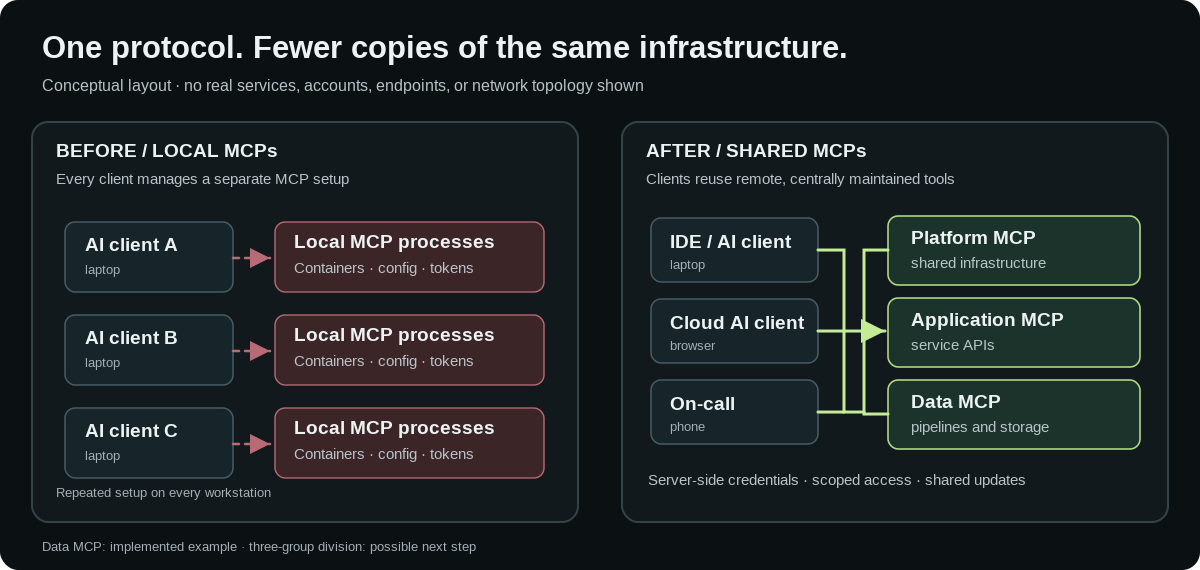
The diagram is deliberately conceptual. The Data Warehouse MCP is the implemented example; the three-way division shown on the right is a possible next step, not a claim that the entire organization has migrated.
What about credentials?
In this setup, service credentials are managed server-side through AWS Secrets Manager. Developers no longer need a separate local service token for every integration reached through the MCP.
The critical detail is where permissions are enforced. A tool can expose an operation in its interface without the server's credentials being allowed to perform it.
For example, an MCP may know how to trigger a workflow, while the credentials used for a diagnostic connection are read-only. The target service still has to deny the write.
A button existing is not a reason to let the AI press it.
Centralizing credentials is not a security fairy tale, either. Client authorization, scoped permissions, audit logs, secret rotation, and isolation between services still matter. In fact, a shared entry point raises the stakes if those controls are neglected.
From a network endpoint to Devin Cloud
The next question was obvious: if the MCP is already reachable over the network, why not connect it to a cloud AI client?
I used Devin Cloud for the working implementation. The interesting result was not the product name. It was the ability to investigate without running local infrastructure, or even opening a laptop.
A person on call can open the cloud client from a phone, provide the alert, and ask for an investigation.
The MCP architecture is not tied to Devin. It can serve other compatible clients as well. The tools are shared; the choice of AI client stays flexible.
What changes for on-call?
The traditional workflow usually starts with a monitor, then logs, then the right cluster, environment, service, time window, deployment history, and possibly a database or object store.
That assumes you already know the application.
If you don't, your first task is to find someone who does.
With a connected AI client, the starting point can instead be a question accompanied by the alert. A useful first report answers:
- What happened, and when did it start?
- Which components and data are affected?
- What is the likely cause, and what evidence supports it?
- Is the problem still happening?
- Is immediate action necessary?
- Is this a code change, a configuration issue, or something outside the application?
The answers still need engineering judgment. AI doesn't become correct just because its Markdown is tidy. But it can collect the evidence before the engineer even reaches a desk.
A real production incident
It didn't take long to test the approach against something that had genuinely broken.
A scheduled Data Warehouse process that fetched metrics from a third-party API had been failing repeatedly. Over several days, it accumulated more than a hundred failed runs.
I gave the investigation to Devin.
Using the connected tools, it correlated workflow history, task logs, data artifacts, and recent code changes.
What the investigation found
The external API had started returning PERMISSION_DENIED for the accounts the integration needed to access.
No useful data arrived. The expected objects were not written to storage. A later stage detected the incomplete extraction and failed the workflow, generating repeated alerts.
The investigation also checked whether recent changes to the relevant code could explain the timing. They didn't. An authorization change later restored successful runs.
But "it's green now" was not the end of the story.
Two consequences remained:
- Missing data from the affected period would not be restored automatically under the existing scheduling configuration.
- The original exception was not logged with enough detail, making manual diagnosis unnecessarily painful.
The report distinguished what the evidence established from what it could not. It confirmed loss of access but could not prove why the previous credentials lost their permissions. That's exactly the kind of uncertainty a reliable investigation should preserve.
Bonus: the green workflow that loaded nothing
While working through related behavior, I also found a separate error-handling bug.
In one scenario, an upstream API request failed and the expected data never arrived, yet the workflow still finished with success.
The orchestration UI looked gorgeous. Green everywhere. A perfect opportunity to go make coffee.
Except the data was missing.
This was a separate failure path from the repeatedly failed runs described above. The bug was that application failure hadn't been propagated to the workflow status correctly.
For data systems, a successful task status is not proof of a successful data outcome.
Green is a color. It is not a postcondition.
Two minutes. But speed isn't the biggest win.
My initial investigation through Devin Cloud took roughly two minutes. Based on the manual steps I'd normally perform, I estimate it was at least five times faster.
That's a personal, conservative estimate, not a controlled benchmark. It's also time to initial diagnosis, not mean time to recovery. Fixing a broken integration or backfilling missing data can still take much longer.
The more interesting part is who can use it.
I work with the Data Warehouse regularly. Other members of the on-call rotation mostly work on different projects. They don't have the same mental map of its workflows, storage, dependencies, and failure modes.
For them, the gain may be larger than mine. More importantly, they can get a grounded first assessment without becoming experts in every application they cover.
And because the client runs in the cloud, an on-call engineer can start that assessment from a phone. They can decide whether they need to find a laptop immediately, call an application owner, or simply keep an eye on something that has already recovered.
That's a different on-call experience. It also got positive feedback from the people actually doing the shifts.
What's next: three MCPs, not thirty
A working Data Warehouse example raises a natural question: what happens when the same idea reaches the rest of the engineering organization?
That environment is more complicated: multiple backend services, their own APIs, shared infrastructure, and deployments spread across environments and regions. Copying one MCP and declaring victory would be optimistic even by software industry standards.
I'd rather group the integrations by responsibility:
- Platform MCP: shared infrastructure, observability, runtime and deployment inspection.
- Applications MCP: business-service APIs and application-specific diagnostics.
- Data MCP: pipelines, warehouses, transformations, and ingestion tooling.
Three conceptual entry points instead of a collection of locally launched servers.
Different AI clients could use the relevant group and combine evidence across groups when an incident demands it. Service permissions and ownership would still dictate the actual boundaries.
Only the Data Warehouse implementation is proven so far. Expanding the pattern across other projects is a proposal, and integrating different services will take real engineering work.
This isn't just for on-call
Incident response is the clearest demonstration, but the same tools are useful during ordinary development.
An engineer can inspect a service, investigate an unexpected result, query relevant data, or ask for a health summary across related components without juggling multiple UIs.
A new developer can get a useful first look at a system without first assembling a collection of MCP containers and local credentials.
And the team becomes less dependent on that one person who remembers which log is useful, which system owns a piece of data, and which obscure dashboard explains the problem.
This doesn't replace documentation or expert knowledge. It reduces the amount of specialist context needed to begin.
AI helped build it, too
There's another part of this story worth mentioning.
While an AI coding assistant worked on pieces of the MCP implementation, I continued with other engineering tasks. I returned to review the results, adjust the design, validate tests, and coordinate the infrastructure review with DevOps.
That parallel work helped me finish three substantial tasks in one day, with the MCP project being one of them. The implementation also went through an extensive automated test suite, code review, and infrastructure review.
The point isn't that AI wrote code while I stopped thinking. The architecture, verification, and responsibility still belonged to the engineer.
The useful change was in throughput: work that could safely proceed in parallel no longer had to sit idle behind my keyboard.
The trade-offs
A shared MCP layer is still an infrastructure component, not a magical shortcut around operating one.
It introduces its own availability and monitoring needs. Broad integration makes authorization mistakes more consequential. AI-generated analysis can be wrong, especially when logs are incomplete. New service integrations need tests, scoped access, ownership, and maintenance.
We also need better measurements from a broader set of incidents before claiming an organization-wide reduction in diagnosis time.
None of that invalidates the approach. It simply means the infrastructure complexity hasn't vanished. We've moved it out of individual workstations into a place where we can maintain and control it deliberately.
The conclusion I didn't plan to reach
What began with an annoying pile of local containers became a networked MCP implementation, a cloud-connected diagnostic workflow, and a credible direction for wider engineering tooling.
The important result isn't the number of tools or even the time saved.
A good engineering platform shouldn't require every developer to become an expert in every system. It should make the right information and tools available when they're needed.
Now an engineer can ask about a service, get a cross-system status report, or start investigating a production alert from a phone.
All because I wondered why we were launching so many MCP servers locally.
Although, to be completely accurate, it started because someone asked me to update a Confluence page.
I didn't update that page on time. But at least the MCP runs on a server now.
Sometimes misunderstanding a task leads to a better result than completing it correctly.
Let's just not make that the recommended software development methodology.